This article represents quick code sample which would help you ssh into a docker machine. Please feel free to comment/suggest if I missed to mention one or more important points. Also, sorry for the typos.
As you double-click Docker Quickstart Terminal, it opens up a terminal window thereby starting “default” docker-machine. If you want to login to this docker-machine, you could do that using following:
- Use Putty to login. As you open Putty, enter the IP such as 192.168.99.100 and click open. It would open up a terminal. Enter “docker” as username and “tcuser” as password and that is it.
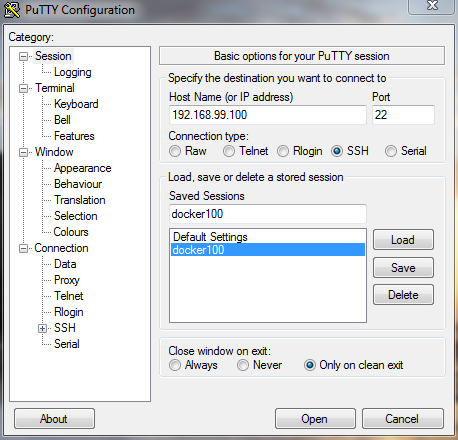
- Use command such as “docker-machine ssh default” in the docker terminal to login to docker-machine namely “default”.

I have been recently working in the area of Data analytics including Data Science and Machine Learning / Deep Learning and BI. I would love to connect with you on Linkedin.
Check out my books titled as Designing Decisions, and First Principles Thinking.
Check out my books titled as Designing Decisions, and First Principles Thinking.
Latest posts by Ajitesh Kumar (see all)
- The Watermelon Effect: When Green Metrics Lie - January 25, 2026
- Coefficient of Variation in Regression Modelling: Example - November 9, 2025
- Chunking Strategies for RAG with Examples - November 2, 2025

I found it very helpful. However the differences are not too understandable for me